
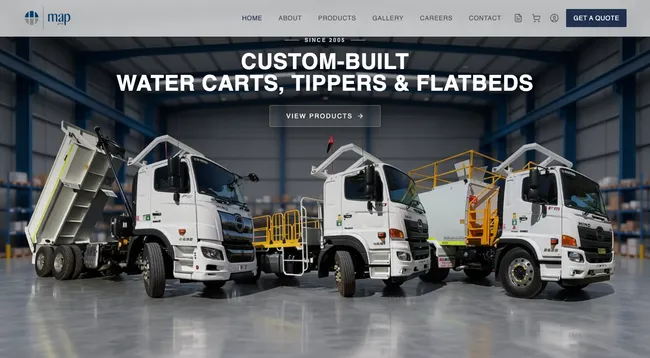
What was built
- A parts catalogue fed from simPRO: part numbers, names, manufacturers, prices and photos
- Change detection that flags price and detail updates before they go live
- Stripe checkout for parts under $1,000, quote requests above
- Freight priced by postcode zone and part size, with the size grade kept in simPRO
- Paid orders sent to simPRO as service jobs, quote requests as simPRO quotes
- A 4-step truck configurator that ends in a quote request
- Customer and admin portals
The problem with two catalogues
Any business that sells parts online and runs simPRO in the back office hits the same wall. The parts, prices and part numbers are already in simPRO, because that is where quotes and jobs get built. A website with its own product list means a second copy of the same data. Someone has to update both, and the day they forget, a customer pays last year's price for a part that has gone up.
The fix is simple to describe: simPRO stays the master copy, and the website reads from it.
How the simPRO connection works
simPRO has a REST API. The MAP Group admin has a “Browse simPRO” screen that loads the live catalogue, around 1,070 items, in about five seconds. MAP's team filters by simPRO group or manufacturer, ticks the parts they want to sell online, and drops them into a product family and category on the site. Each product keeps its simPRO ID, so the website and simPRO always agree on which part is which.
Not every item in a simPRO catalogue belongs on a public website. Choosing what gets published is a business decision, so a person makes it, not a script.
- 1simPRO
Parts, prices, groups and photos, maintained by MAP's team as usual.
- 2Admin review
Browse the live catalogue, pick parts, see what changed since last import.
- 3Live site
Only approved parts and prices are published to customers.
When a price changes in simPRO
The site compares every imported part with its live simPRO record: name, part number, manufacturer, price including GST, groups and freight fields. Anything that changed shows up as a banner at the top of the admin, an “Updated” badge on the row, and a “Changed in simPRO” filter.
Nothing is overwritten automatically. An early version synced every night; the current one puts a person in between. Someone looks at the list of changes and applies them in one click, which means a price typo in simPRO gets caught before a customer sees it. Applying updates never touches what the admin decided on the site: published status, photos and categories stay as they were.
Product photos without public links
simPRO stores photos as attachments on each catalogue item, with no public link a website could point to. So the site downloads them once and keeps its own copy. It looks for a “Website Images” folder on the part first, then falls back to the default image. That gives MAP's team a simple rule: put the good photo in that folder and it becomes the website photo.
simPRO limits how fast its API can be called and answers with an error when you go over. The import runs at most three requests at once and waits the time simPRO asks for before retrying, so a big import finishes instead of failing halfway.
Pay online, or ask for a quote
Selling heavy equipment parts online is not like selling t-shirts. A $40 filter should be a two-click purchase. A big assembly needs a conversation first. The rule on MAP's site: under $1,000 including GST, the price is shown with an “Add to Cart” button and Stripe takes the payment. At $1,000 and above, or when there is no price, the same spot says “Quote on request”.
Freight is the other half. Each part carries a size grade, stored in a simPRO custom field so it lives with the rest of the part's data. The site combines that grade with the delivery postcode to price shipping. The biggest grade always goes to a manual quote. At checkout the server recalculates every price and every freight line from the database, so nothing a customer's browser sends can change what they pay. When Stripe confirms a payment, the customer gets a confirmation email and MAP gets a new order notice.
Orders and quotes land in simPRO
A web order is no use if someone has to retype it. When Stripe confirms a payment, the site creates a service job in simPRO with each part as a catalogue line and the freight as its own line. Parts go in with no markup, because simPRO would otherwise add the customer's pricing tier on top and the job total would no longer match what was paid.
Quote requests work the same way and become simPRO quotes, with the parts at the website price and any custom truck build written into the description. The site finds the customer in simPRO by email, or creates them if they are new. Each job and quote carries the website's reference number, so the same order can never be sent twice. If simPRO doesn't answer, the order is marked as failed in the admin with a Retry button.
The truck configurator
Parts are half the business. The other half is the trucks. Customers build a water cart, service truck, Hardox tipper or flat tray in four steps: variant, chassis, options, review. Each variant only shows the chassis it fits on, and options are grouped the way MAP quotes them: compliance, access and safety, electrical, storage, finish. The result goes into a quote request rather than a cart, because nobody buys a service truck with a credit card. MAP's team edits every variant, chassis and option from the admin, without a developer.
Two portals
Customers get an account with their orders, their cart, their quote list and the history of their quote requests. MAP's team gets an admin that covers the parts catalogue, the simPRO browser, orders, quotes with a status (new, replied, won, lost), the configurator, the gallery, news and the text of the main pages. MAP's team runs the site day to day from there.
Does your business run simPRO?
If you sell parts or products and they already live in simPRO, a website can use them as they are, and send the orders and quote requests straight back into simPRO as jobs and quotes. Your team keeps working in one place.
Off-the-shelf connector apps are worth a look if you want a standard online shop. A custom build makes sense when your sales process has rules a store template can't follow: quote thresholds, configurable products, freight that depends on what is being shipped, customer accounts that look like your business.
And it isn't only simPRO. The same approach works with most software that has an API. Tell me what you run and I'll tell you straight whether it can be connected, and roughly what it would take.
Questions about simPRO website integration
Want your website connected to your software?
Send me the name of the tool you use and what you'd like the site to do with it.
More reading: WooCommerce vs custom e-commerce · Shopify vs custom website · Custom coded website vs website builder