
Who needs one
A portal pays off when the same customers order again and again, and your team spends hours answering "do you have this part, how much, when can it ship". Typical cases in WA: mining and plant equipment suppliers, equipment hire companies, industrial wholesalers, trade suppliers with a few hundred regular accounts.
If you sell a handful of products to the public, you don't need a portal. A normal online shop will do.
The 8 features, checked against a real portal
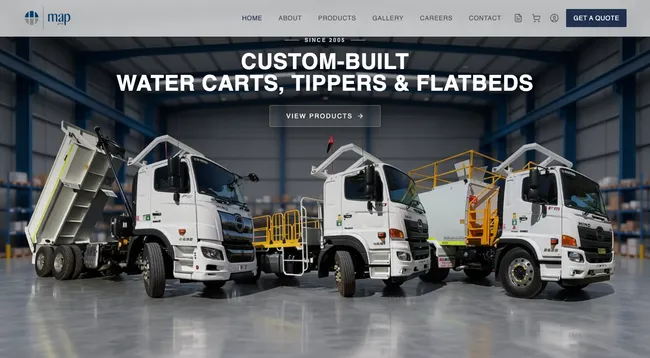
MAP Group builds water carts, service trucks and tippers for WA mine sites and sells the spare parts. Their simPRO catalogue, the job software their team uses every day, holds about 1,070 items. Here is what their portal does today.
A searchable parts catalogue
Customers find a part by family, category or part number, with photos and specs.
MAP Group: Built. Spare parts sorted by product family (water trucks, service modules, tippers) with filters.
Customer accounts
Each customer logs in and sees their own orders, cart and quote requests.
MAP Group: Built. A dashboard with orders and a history of quote requests.
Pay online or ask for a quote
Small orders get paid by card. Big or custom orders go through a quote.
MAP Group: Built. Stripe checkout under $1,000, quote request above.
Freight that makes sense
Freight priced by delivery zone and the size of what is shipped, not a flat guess.
MAP Group: Built. Priced by postcode zone and a size grade stored in simPRO.
Orders land where your team works
No copying orders from an email into your job software.
MAP Group: Built. Paid orders become simPRO service jobs, quote requests become simPRO quotes.
An admin your team runs alone
Your staff update products, prices, quotes and pages without calling a developer.
MAP Group: Built. Quotes tracked as new, replied, won or lost. Catalogue, pages and news edited from the admin.
A product configurator
For products built to order: the customer picks options and sends a complete request.
MAP Group: Built. A 4-step truck configurator that ends in a quote request.
Invoices and job status in the portal
Customers download invoices and see where their job is without phoning.
MAP Group: Next phase. The data exists in simPRO, the portal pages are not built yet.
The full technical story of the simPRO connection is in the MAP Group simPRO case study.
What it costs: $3,000 to $15,000
Every portal is quoted in writing before work starts. What moves the price:
- Low end: a catalogue with search, customer logins and quote requests by email.
- Middle: online payments, freight rules, an admin your team runs alone.
- High end: a two-way connection with your job or stock software, a product configurator, per-customer prices.
Hosting and maintenance after launch are separate and small. For a simple business website, see the fixed-price packages.
How long it takes: 4 to 9 weeks
- Week 1: a call, a written scope and a price. A free mockup before the 50% deposit.
- Weeks 2 to 4: catalogue and customer accounts, loaded with your real products.
- Weeks 4 to 7: payments, freight, admin, and the link to your software if you need one.
- Last 1 to 2 weeks: your team tests with real orders, then launch.
The connection with business software is what stretches a project. Every field gets checked against how your team really uses it, because a wrong price in front of a customer costs more than a week.
Custom portal or off-the-shelf?
Shopify B2B and wholesale portal apps are cheaper to start and fine for a standard wholesale shop. Go custom when your sales process has rules a template can't follow: a price threshold between checkout and quote, products built to order, freight by part size, orders that must land in your job software. That was MAP Group's case.
B2B ordering portal: questions
Thinking about a portal for your customers?
Tell me what you sell and what software you run. You get a straight answer and a written price.
More reading: simPRO website integration (MAP Group) · WooCommerce vs custom e-commerce · Shopify vs custom website